« PREV: ToVieFor WordPres...
Quarterback Acade... :NEXT »

Report Error WP Plugin

Report Error WP Plugin

Daddy Design is proud to introduce our very 1st WordPress plugin, WP Report Error. This plugin was born out of the need to allow users to submit potential errors on a database website that we created, when no viable options were found we decided to build the plugin ourselves.

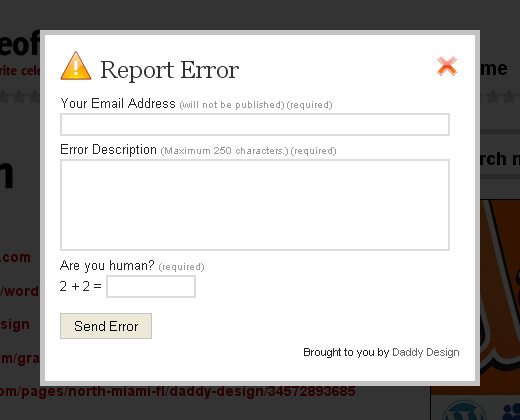
The Report Page/Post Error WP Plugin allows website visitors to inform the WordPress owner/webmaster that there is a potential error on a page or post. This plugin is extremely flexible with options to insert a “Report Error” link on every page/post, on individual pages/posts via shortcode, or into your theme’s template via php script. When the “Report Error” link is clicked, a small contact form will pop up via javascript, the user can then input an optional message and submit the form, the form also features an easy captcha to avoid potential spammers. The owner/webmaster will then receive an email with a link to the exact page or post where the reported error is located and any additional messages from the user.

Version

*1.6 Two new admin features added in Plugin options page , 1. Hide error “Icon” and 2. Hide “Email” field from the pop up form.
1.5 Fixed Spam issues. Make sure to have Askimet Plugin installed!
1.3 Fixed upload issues from the 1.2 upload
1.2 Insert strings needed for multiple languages.
1.0 Released

WP Report Error Live DEMO

Check out http://theofficialpageof.com/daddy-design to view the WP Report Error Pugin in action.

Screenshots

Report Post Error Pop Up Screenshot

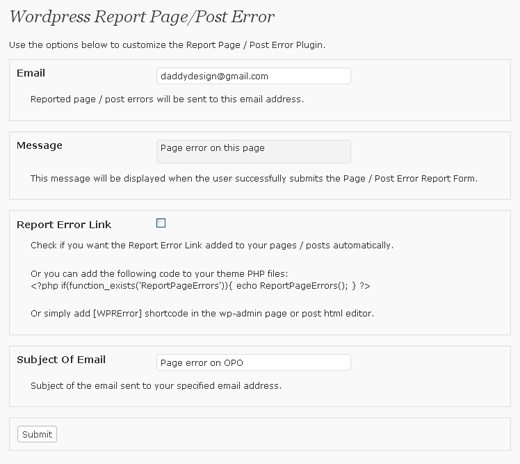
report page error admin options screenshot

Download the WP Report Error Plugin

Download or Install Directly via the WordPress Plugin Directory Winzip Direct Download

Downloads Per Day

Installation

  1. Upload the ‘wp-report-error’ folder to the ‘/wp-content/plugins/’ directory.
  2. Activate the plugin through the ‘Plugins’ menu in WordPress.

Usage

To get started visit the plugin’s admin settings page and follow the steps below:

  1. Insert the email address that you want all reported errors sent to.
  2. Insert the message you want displayed when the user successfully submits the Page/Post Error Report Form.
  3. Determine the option you want for using the WP Report Error Plugin, check below for detailed options.
  4. Insert the subject of the email sent to your specified email address.

There are three available options for using the WP Report Error Plugin, check below to find out which option is best for your website:

  1. In the plugin’s admin settings check the box to allow the Report Error Link to be added automatically to all of your pages/posts.
  2. To add to individual pages/posts use the [WPRError] shortcode in the wp-admin page or post html editor.
  3. To add to your theme’s template files use the following php code:
    <?php if(function_exists('ReportPageErrors')){ echo ReportPageErrors(); } ?>

Need Support?

If you have any problems with this plugin or need help, please leave us a comment below and we will respond as soon as possible.

Posted In

Wordpress Plugins

54 Comments

  1. Faisal Humayun August 6, 2011

    Plugin functions well, however, the spam challenge is just too easy to break by spammers.
    98% of all reports are blank emails from spam email addresses. Please use some form of validation which prevents sending of message without body text and a more dynamic spam challenge.
    Thanks

    Reply
  2. winsa September 27, 2011

    hello,

    Thank you for this plugin that works well with me. But I have not found how to change the link anchor. Can you tell me how?

    Excuse my english I’m french.

    Reply
  3. BaDeR October 12, 2011

    Hello, I really liked this plugin and I already install it, but now i face a to problem
    1- is the (are you humen?) this field accept any value and empty value
    2- the successful massage is not a UTF-8 encoding

    please can you help me on this in http://shklol.com

    Reply
    • BaDeR October 12, 2011

      note: the previews problem happen when I disable email option

      Reply
    • daddydesign October 12, 2011

      thank you for the feedback, we are looking into this issue.

      Reply
  4. winsa October 12, 2011

    @daddydesign No answer to my question?

    Reply
  5. Skant October 28, 2011

    Hello,

    it’s very cool but it’s not working on my site,
    When I click on Send Error button it goes on a blank page pointing to the plugin folder like this:

    http://www.misite.com/wp-content/plugins/wp-report-error/send_email.php?action=sendemail#wprresponse

    I’m using WordPress 3.1.4,

    Anybody knows how to fix it?

    thanks,
    best regards,

    Reply
  6. Beth @ In Good Cents January 13, 2012

    I keep getting blank emails from the Error Report. No link, description, or even an email address. Any ideas how to fix this? I’m worried they are real, but the information isn’t getting through.

    Thanks!

    Reply
    • daddydesign January 15, 2012

      HI Beth,

      It’s probably because of the capcha. We are making upgrades to it as we speak and will update the plugin asap..

      Reply
      • Beth @ In Good Cents January 15, 2012

        Thank you!

        Reply
  7. Marcelo March 31, 2012

    Hello, I use your plugin for 2 years and I feel very good! But from the beginning must be something:

    I need the plugin sent the mail to the author of the post and the admin, not only to my mail but also warning that the author of the post since my blog is used by many authors.

    Reply
« Previous Comments   /   More Comments »

Leave a Reply

Your email is never published nor shared.
Required fields are marked *

You may use these HTML tags and attributes:<a href="" title=""> <abbr title=""> <acronym title=""> <b> <blockquote cite=""> <cite> <code> <del datetime=""> <em> <i> <q cite=""> <strike> <strong>

Notify me of followup comments via e-mail. Or subscribe without commenting.

 
Fixing YouTube iFrame Z-index using jQuery | Daddy Design http://t.co/nuonateM2 days ago