Daddy Design is proud to introduce our very 1st WordPress plugin, WP Report Error. This plugin was born out of the need to allow users to submit potential errors on a database website that we created, when no viable options were found we decided to build the plugin ourselves.
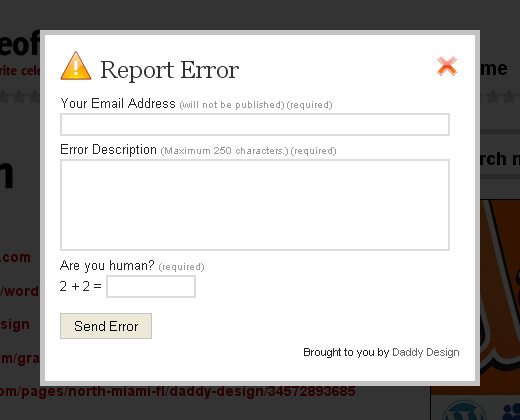
The Report Page/Post Error WP Plugin allows website visitors to inform the WordPress owner/webmaster that there is a potential error on a page or post. This plugin is extremely flexible with options to insert a “Report Error” link on every page/post, on individual pages/posts via shortcode, or into your theme’s template via php script. When the “Report Error” link is clicked, a small contact form will pop up via javascript, the user can then input an optional message and submit the form, the form also features an easy captcha to avoid potential spammers. The owner/webmaster will then receive an email with a link to the exact page or post where the reported error is located and any additional messages from the user.
Version
*1.6 Two new admin features added in Plugin options page , 1. Hide error “Icon” and 2. Hide “Email” field from the pop up form.
1.5 Fixed Spam issues. Make sure to have Askimet Plugin installed!
1.3 Fixed upload issues from the 1.2 upload
1.2 Insert strings needed for multiple languages.
1.0 Released
WP Report Error Live DEMO
Check out http://theofficialpageof.com/daddy-design to view the WP Report Error Pugin in action.
Screenshots
![]()
Download the WP Report Error Plugin
Download or Install Directly via the WordPress Plugin Directory Winzip Direct Download
Downloads Per Day
Installation
- Upload the ‘wp-report-error’ folder to the ‘/wp-content/plugins/’ directory.
- Activate the plugin through the ‘Plugins’ menu in WordPress.
Usage
To get started visit the plugin’s admin settings page and follow the steps below:
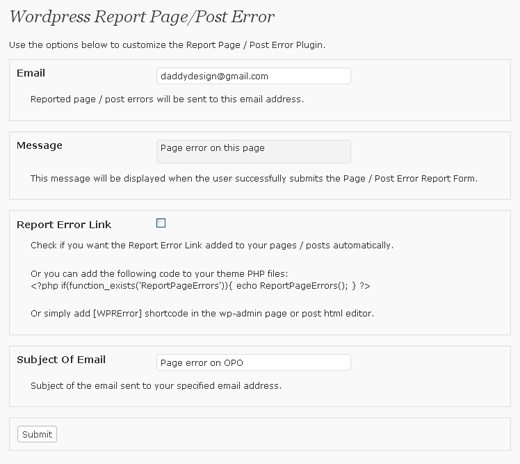
- Insert the email address that you want all reported errors sent to.
- Insert the message you want displayed when the user successfully submits the Page/Post Error Report Form.
- Determine the option you want for using the WP Report Error Plugin, check below for detailed options.
- Insert the subject of the email sent to your specified email address.
There are three available options for using the WP Report Error Plugin, check below to find out which option is best for your website:
- In the plugin’s admin settings check the box to allow the Report Error Link to be added automatically to all of your pages/posts.
- To add to individual pages/posts use the [WPRError] shortcode in the wp-admin page or post html editor.
- To add to your theme’s template files use the following php code:
<?php if(function_exists('ReportPageErrors')){ echo ReportPageErrors(); } ?>
Need Support?
If you have any problems with this plugin or need help, please leave us a comment below and we will respond as soon as possible.


Pretty good, had a little play with the “Report” button as i didn’t want an image. I think there should be an option to either have a “Report” button with an image, or just a simple text link without an image.
Jake, that’s a very good idea. We will play around with that on our next version.
Hi!
This plugin is very useful, but there is a little problem: Report Error link is visible only in article but nont in pages.
I tried:
- entering the code in the template
- enabled option Report Error Link in the backend (wp-admin).
Is it a problem only for my template?
Best Regards.
Davide, we are looking into this issue right now. Thank you for bringing it to our attention.
Keep posting stuff like this i really like it
I also have the same problem than davide : no report error for pages … and I only use pages
)
Thanks DADDYDESIGN
I’m working to create a language file for plugin.
Hello,
I’m testing your plugin on my blog and I have a “strange” problem. It does not show on the home page – code inserted in index.php.
It could be nice if you managed the internationalisation of the plugin as it can be used only by english spoken people for the moment…
Li-An, at the moment this plugin only works in post and pages. We will be creating more features in the future to both of your request. Thank you for the suggestion.
Not a problem, its a good simple plugin.
Hi DADDYDESIGN!
I’ve modified your plugin for support languages.
If you are interested, this is the link for download (italian translation is included):
http://www.jqueryitalia.org/wp-report-error.zip
I have tested it in my site and it works
Any news for the bug on pages?
Best regards.
Thank you Davide! I Will check this out later tonight or tomorrow. We are currently still fixing the page problem. And we are also adding a new captcha system.
Great news, mate!!
I’m waiting for new release
It’s a pleasure for me help you.
Regards.
Hi Davide, You can download the zip again on the wordpress server. We fixed the page problem. Let us know if there are still some problems. Our next version will have a new captcha system and will have your language add-on in it
Hi Daddy!
I download it and install: now it’s all OK!
I update my release too.
So you can download your fixed plugin with language support at the same link: http://www.jqueryitalia.org/wp-report-error.zip
It’s contain general language .mo file and italian translation.
Best Regards.
The plugin is great, only trouble is that for the last few days I get several fake reports from just one user (in the body of the email there r links to all the adult stuff. If I cud know the IP address of the user then I could ban him easily using wp ban. But no such info is given by the plugin.
Thanks for considering my request.
Hi Arindam, thank you for bringing this matter to us, we will look into this. We are currently working on a better spam captcha system for it.
[WPRError] This don’t work in post, Comes up as plain text, what should i do?
In two days of installation, 2 spams. I have no problem of spam with Contact Form 7 so I hope you will find a solution…
Hi Li-An,
We are looking into this issue and are working on a better spam filter. Sorry about this, please keep checking in for a update.
Hi Daddydesign,
i have maybe a jquery conflict problem, if i click on Report Error link in my page http://goo.gl/7aX6 it doesn’t show any form.
installe das stated, however comes back with “error sending email” and I don’t receive anything at the backend. Any ideas as noone else seems to have a problem with the install side I feel I must have done something wrong.
Sam
@Sam, can you explain the issue a little more, I’m a little confused on what your issue it.
this is a really cool plugin.!!
but i dont want the options of email and the spam as its a really small site i dont expect spam in that …trying to remove that ..but its not getting removed..even if i remove from the report plugin.php,just the spam part…it just dont work
if anyones knows mail me jake4u@live.co.uk
@Jake, We are currently working on a few new options for this plugin. We will consider adding an option in the back end to not insert the email field.
UPDATE! Request from users, We added two new admin features:
1. Hide error “Icon” (hides the Yellow icon so now you can have just a text link).
2. Hide “Email” field from the pop up form (now the submitter does not have to input an email and just notify you about the error).
French translation:
http://www.li-an.fr/wpplugins/mes-traductions-de-plugins/#reporterror
(I don’t remember you gave me an email so I can send you the files by mail. If you are interested…
)
Hi mate!
I sent to you an e-mail with some modifications made for last version of your plugin.
Regards.
hello, this is great plugin im trnslated it in two arabic language and name translated file to wp-report-error-ar_AR.mo but no translated show in arabic all is english are you sure this supported .mo file in any language please ?
Hello,
The cross to close the popup does not appear on the screen.
someone has already encountered this trouble … ?
thank you for the help
@casav, can I see your site this is happening to?
Hello
The site is off because is under construction.
I found the source of the problem without finding a solution.
The cross appears when I turn off the theme and its framework
I use “reaction” rockettheme template with gantry framework.
I hope you can help me
Regards
Hi, how can we use this in an image? Tried putting “ inside an image a href but it doesnt work at all.
Hi,
I added this to my new site a few weeks ago and it tested OK. Now, it no longer pops up the form. I cannot tell why. Can you give me a clue? Visit any of the articles on the site to see for yourself. Thank you.
Hmm, that’s weird. Have you tried replacing the plugin? Let me do some digging to see if this is happening to other people.
Tried your plug-in on one of my sites. I like it, but how about if it returned to the visited page? The configured message on the Setting page appears to thank them (my words from the settings page) and then the only option for the user is to close the window. I would like them to return to the page they were looking at when they clicked the error link.
Rather than sending the report to email, how about using a database of some sort and show a listing of all reports in the wp backend.
HI Virendar, that’s actually a very good idea and might help with our email spam issue. We will look into this! Do you know or know anyone capable of helping us with this?
I added
in the WordPress Theme Editor but they doens’t show on the Webpage
Hey Matza,
I just went into your post and I see it, what issue are you having?
Then i open a only Post, in the end of the content i seeing “Report Error”
But i have addet the PHP-Code in the Theme-Editor, that show the “Report Error” on the Mainpage, but i doesn’t see it
Great plugin,
Might I request:
1. When the user clicks on send, just close the ajaxified popup instead of taking user out to a new page
2. Allow users to customize a list of categories from a dropdown
3. Capture the IP address of the reporter so that spamming IPs can be added to a block/ban list.
4. Show report in dashboard
Hi,
I’m trying this plugin but it shows the report icon only on pages, not posts. I tried inserting the shortcode in posts too, doesn’t work. I’m using WP 3.2.
Please help.
Thanks