« PREV: Social Mavens...
Putts Perfect... :NEXT »

custom facebook fan box

How to Customize your Facebook Fan Box

With the addition of a facebook fan box to your website you’re not only benefiting your end users but also yourself. The fb fan box allows users to directly view how many friends you have on your facebook page and also allows them to become a fan with just one click. The only potential downsides to adding a fan box to your page is that it is not easy to customize or the original styling just doesn’t match up with the unique style of your site. Well not anymore, in this tutorial we are going to teach you how to customize your very own facebook fan box.

This tutorial will teach you step by step how to customize your facebook fan box to look like ours. After completing this tutorial you should be able to play around with the code and make modifications that you see fit to change the styling to your own needs.

4/29/10 – This tutorial has been updated to allow full customization of the Facebook Fan Box and positioning of the new “Like” button.

Setting Up Your Widget

Step 1 – Get Your Facebook Fan Box Code

First things first you need to get the code for your facebook fan box from facebook, your code should look something similar to the code below.

<script type="text/javascript" src="http://static.ak.connect.facebook.com/js/api_lib/v0.4/FeatureLoader.js.php/en_US"></script>
<script type="text/javascript">FB.init("1690883eb733618b294e98cb1dfba95a");</script>
<fb:fan profile_id="34572893685" stream="0" connections="10" logobar="0" width="300"></fb:fan>
<div style="font-size:8px; padding-left:10px"><a href="http://www.facebook.com/pages/North-Miami-FL/Daddy-Design/34572893685">Daddy Design</a> on Facebook</div>

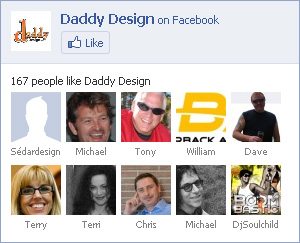
facebook fan box default styling

Step 2 – Linking Your CSS

The second step is to set up the linking to your css code and adjusting your facebook fan box code to allow for the customization you’re about to start. The div associated at the end of the original fan box code is only a link back to your facebook page, we decided to remove it, however you may choose to leave it. Items that we have changed in our code are the width from 300 to 240 and connections from 10 to 8, your width and number of connections may change depending on the space available for your fan box. Items we have added are height at 200 (also subject to change) and the line of code to link to our css stylesheet. Please view the updated coded below.

<script type="text/javascript" src="http://static.ak.connect.facebook.com/js/api_lib/v0.4/FeatureLoader.js.php/en_US"></script>
<script type="text/javascript">FB.init("1690883eb733618b294e98cb1dfba95a");</script>
<fb:fan profile_id="34572893685" stream="0" connections="8" logobar="0" width="240" height="200" css="http://www.yoursite.com/stylesheet.css?1"></fb:fan>

One important item to take notice of is ‘?1’ which appears at the end of the css link, this item is the cache level for the facebook fan box, every time you make changes to the css inside your stylesheet and upload to your server you must change the number after the question mark to correspond with the number of edits you have made.

Here’s another handy tip, if you are using wordpress you can insert your code to look like the code below, this will link straight to your wordpress stylesheet. (Make sure you edit the ‘?1′ accordingly.)

css="<?php bloginfo('stylesheet_url'); ?>?1"

Styling Your Widget with CSS

Step 1 – Styling the Main Widget

The first step in customizing the css is to fix link hover issues and to remove any unneeded styling from the main widget. Check the first set of css modifications below.

.fan_box a:hover{
  text-decoration: none;
}
.fan_box .full_widget{
  height: 200px;
  border: 0 !important;
  background: none !important;
  position: relative;
}

In lines 1 through 3 of the code we have removed the underline hover effect for all links inside the fan box to avoid any type of conflicts. In lines 4 through 9 of the code we have removed the border from around the full fan box widget, set the height to match our widget height, removed the background, and positioned it to allow for the moving of the “Like” button. One thing to keep notice of is the usage of ‘!important’, this is a css trick that will override the already used css code inside of the widget, anything that we change that currently has any values associated with it must use this code or else the original code will still take priority.
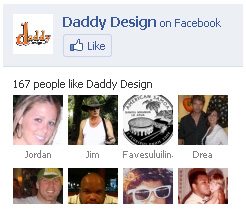
facebook fan box - step 1

Step 2 – Styling the Widget Header

The second step in customizing the css is to adjust the fan box header. Check the second set of css modifications below.

.fan_box .connect_top{
  background: none !important;
  padding: 0 !important;
}
.fan_box .profileimage, .fan_box .name_block{
  display: none;
}
.fan_box .connect_action{
  padding: 0 !important;
}

We are basically going to be getting rid of everything in the widget header except for the “Like” button, which we will position to the bottom of our widget later. In lines 1 through 4 we have gotten rid of the light blue background color for the header and removed all of the headers padding. In lines 5 through 7 we have completely removed both the main profile name and image. In lines 8 through 10 we have removed padding associated with the “Like” button that was not needed.
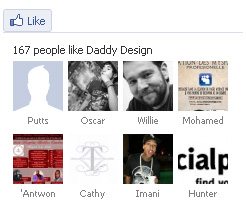
facebook fan box - step 2

Step 3 – Styling Fan Connections

The third step in customizing the css is to adjust the actual fb fan connections. Check the third set of css modifications below.

.fan_box .connections{
  padding: 0 !important;
  border: 0 !important;
  font-family: Arial, Helvetica, sans-serif;
  font-size: 11px;
  font-weight: bold;
  color: #666;
}
span.total{
  color: #FF6600;
  font-weight: bold;
}
.fan_box .connections .connections_grid {
  padding-top: 10px !important;
}
.fan_box .connections_grid .grid_item{
  padding: 0 10px 10px 0 !important;
}
.fan_box .connections_grid .grid_item .name{
  font-family: "lucida grande",tahoma,verdana,arial,sans-serif;
  font-weight: normal;
  color: #666 !important;
  padding-top: 1px !important;
}

In lines 1 through 8 of the code we adjusted the padding surrounding the fan box connections, removed the border at the top, and adjusted the font for the line of text that displays “X people like Profile Name”. In lines 9 through 12 of the code we have adjusted the color and font weight of the number of fans displayed. In lines 13 through 15 of the code we have adjusted the padding between the line of text and the actual fan connections. In lines 16 through 18 of the code we have adjusted the padding between the actual fan connections. In lines 19 through 24 of the code we have adjusted the actual fan name, make sure that you DO NOT change the font family, if changed it may cause alignment issues with the connections.
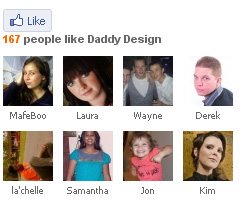
facebook fan box - step 3

Step 4 – Positioning the “Like” Button

The fourth and final step in customizing the css is to position the “Like” button. Check the fourth and final set of css modifications below.

.fan_box .connect_widget{
position: absolute;
bottom: 0;
right: 10px;
margin: 0 !important;
}
.fan_box .connect_widget .connect_widget_interactive_area {
margin: 0 !important;
}
.fan_box .connect_widget td.connect_widget_vertical_center {
padding: 0 !important;
}
 

With the addition of this block of code the “Like” button will now appear at the bottom right of our fan box widget. How does this work? It works because earlier we used relative positioning on the main widget div in Step 3, whenever relative positioning is used on an element you can then use absolute positioning to position another element anywhere inside of the main element. The way to position the element is by using the attributes top, bottom, left, and right depending on where you want to move the element. In our situation we wanted it to be at the bottom right of our widget so we used the attribute bottom with a position of 0 and right with a position of 10px. The reason we used 10px for right instead of 0 is because we had added 10 pixels of right padding to each of our fan connections, this way the button and fan image will line up correctly. Lines 1 through 6 of the code are used to position the actual div to the bottom right of the widget. In lines 7 through 12 of the code we have removed padding and margin associated with the “Like” button and its surrounding table data so that it will align properly.
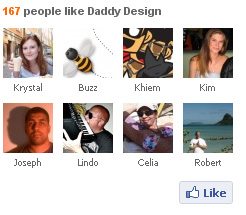
facebook fan box - step 4

Complete CSS Code

Below is all of the css code from the previous 4 steps combined together.

.fan_box a:hover{
  text-decoration: none;
}
.fan_box .full_widget{
  height: 200px;
  border: 0 !important;
  background: none !important;
  position: relative;
}
.fan_box .connect_top{
  background: none !important;
  padding: 0 !important;
}
.fan_box .profileimage, .fan_box .name_block{
  display: none;
}
.fan_box .connect_action{
  padding: 0 !important;
}
.fan_box .connections{
  padding: 0 !important;
  border: 0 !important;
  font-family: Arial, Helvetica, sans-serif;
  font-size: 11px;
  font-weight: bold;
  color: #666;
}
span.total{
  color: #FF6600;
  font-weight: bold;
}
.fan_box .connections .connections_grid {
  padding-top: 10px !important;
}
.fan_box .connections_grid .grid_item{
  padding: 0 10px 10px 0 !important;
}
.fan_box .connections_grid .grid_item .name{
  font-family: "lucida grande",tahoma,verdana,arial,sans-serif;
  font-weight: normal;
  color: #666 !important;
  padding-top: 1px !important;
}
.fan_box .connect_widget{
position: absolute;
bottom: 0;
right: 10px;
margin: 0 !important;
}
.fan_box .connect_widget .connect_widget_interactive_area {
margin: 0 !important;
}
.fan_box .connect_widget td.connect_widget_vertical_center {
padding: 0 !important;
}

Troubleshooting

If you are trying to edit the css and no changes are showing up, make sure you are adjusting the cache level at the end of the css link in the widget code.

If you are having problems getting this tutorial to work please reread the tutorial and try again, if you still can not get it to work please leave us a comment below and we will respond as soon as possible.

Note

4/20/10 – Facebook has currently just changed the “Become a Fan” button to the new “Like” button. We are awaiting any further changes to the Fan Box and once things appear to calm down we will update this tutorial. Keep checking back…

4/29/10 – This tutorial has been updated to allow full customization of the Facebook Fan Box and positioning of the new “Like” button.

Posted In

Tutorials

Share Our Post

  • email
  • RSS
  • Twitter
  • MySpace
  • Facebook
  • Digg
  • StumbleUpon
  • Sphinn
  • del.icio.us
  • Mixx
  • Google Bookmarks
  • Yahoo! Buzz
  • Posterous
  • Faves
  • NewsVine
  • Reddit
  • LinkedIn
  • Ping.fm
  • Design Float
  • MisterWong
  • BlinkList
  • DZone
  • FriendFeed

108 Comments

  1. Stephanie

    THANK YOU! I’ve been trying to do exactly this and the facebook wiki instructions are so vague.

  2. zabava

    I need it THANK YOU!!!

  3. Justin

    Thanks! I’m with Stephanie the facebook instructions are so vague. One thing I figured out: I had the site password protected using htaccess it took me about 20 minutes of trying to finally think of removing the password protection. Now it works great! Thanks again!

  4. Ali Hassan

    I would love to do this but really am having trouble implementing this suggestion.

    Need a little help.

  5. daddydesign

    your welcome Justin!

  6. Nathan

    This is awesome!! I’ve been looking for something like this. Thanks!

  7. Jay

    Great! Many thanks

  8. VINCENT

    Really useful to start, I changed some things and it now works on my blog!

  9. Phonobase Music Services

    What’s the code for “You’re fan” (when you logged in to fb)? It’s different from the button?
    Thanks!!!

  10. daddydesign

    Hello Ali, what sort of trouble are you having in implementing your facebook fan box? Please let us know some more details about what you are trying to do and what type of problems you are having.

  11. daddydesign

    Hello Phonobase,thanks for pointing that out we just noticed that the other day and we are going to be adding it to the tutorial shortly, please check back soon.

    We are also going to be doing a seperate tutorial on how to customize just the “Become a Fan” button, so keep a lookout for that one as well.

  12. Phonobase Music Services

    Thanks!! I have anothe question: as you may know IE need a custom CSS and i’m wondering how to link a specific stylesheet for it. Can i use ?

    Thanks again for this great tutorial!!

  13. Phonobase Music Services

    Can i use “if IE”?

  14. Kursad

    I think it use to all browsers..

  15. daddydesign

    Phonobase, the supplied CSS styling will work perfectly fine in both IE7 and IE8, it should work in IE6 but we have not tested it as we have dropped IE6 support due to recent security issues released about the browser. There is no way to insert two CSS links into the Facebook Fan Box but if you are having issues with IE you can use certain CSS hacks inside your stylesheet that only target IE browsers, however it is always best practice to avoid hacks whenever possible. Hope this helps and thanks again for your interest in our tutorial.

  16. Diane

    I have placed a small Fan Page widget on a contact page in a website I am designing but I cannot change its postion on the page. I only want to move it 100 or so pixels to the right but can’t seem to do this despite trying many ways of achieving this. Any suggestions?

  17. daddydesign

    Hello Diane, easiest way to achieve what you are trying to do would be to wrap the fanbox code inside a div and position it accordingly using css.

    Basic idea is shown below:

    <div style="padding-left:100px;">
      Insert FanBox Code Here
    </div>
    
  18. daddydesign

    Phonobase Music Services, the tutorial has been updated to allow for the styling and positioning of the “You are a Fan” text. Repeat and replace Step 4.

    Let us know if you have any further questions.

  19. Anita Skinner

    Thanks so much for this tutorial!

    I have a problem implementing it though, which I was hoping you could help me with.

    This is the code I have inserted into a ‘Text Widget’ following your instructions the best I can lol!, and it’s obviously not correct.

    The fan page is showing on my sidebar, but not in the style I would like.

    I inserted the complete css code you have provided into my Atahualpa themes ‘HTML/CSS Inserts’ area, but it makes no changes to the Box.

    So I guess my question is: where and how do I create and link the CSS. Do I have to create the CSS, upload to my site and then it will work? I understood by inserting this code ‘css=”?1″‘ into Wordpress it would do it automatically as I am using Wordpress.

    Hope this makes sense, and would greatly appreciate your assistance with this.

    You have my url, so you can visit and view what I am talking about.

    Thanks so much
    Kind regards
    Anita Skinner

    I notice

  20. Anita Skinner

    This is the code referred to in previous comment:

    FB.init(“db19177ad2dfd92319c1a137af5e6d26″);<fb:fan profile_id="104147266285901" stream="0" connections="6" logobar="0" width="190" height="215" css="?1″>

    Thank you
    Anita

  21. daddydesign

    Anita, if you are going to be using the wordpress trick mentioned in Step 2 of setting up your widget then you will need to insert your fanbox’s css code into your wordpress theme’s main style sheet which should be named style.css. The other thing is that you’re forgetting to insert the actual php code needed to link to your wordpress stylesheet.

    The full code looks like this:

    css="<?php bloginfo('stylesheet_url'); ?>?1"

    Put that code into your widget just like that but make sure you update the ?1 to match the number of times you have updated your fanbox css or else the changes won’t show up correctly.

    I also noticed from looking at your website that your sidebar is very skinny, inserting a fanbox there is going to require a lot of tweeking of the css code to make it all fit properly.

  22. Nolan

    I am currently trying to follow this post but I am scratching my head. I am using wordpress and have the following code:

    FB.init("e92419eec6bfabc33da3e49b3b85c860");
    <fb:fan profile_id="108947199145062" stream="0" connections="6" logobar="0" width="196" css="?1"
    >

    Any idea what I am doing wrong?

    http://convoyofhope.eu/wp/

  23. Nolan

    FB.init(“e92419eec6bfabc33da3e49b3b85c860″);
    <fb:fan profile_id="108947199145062" stream="0" connections="6" logobar="0" width="196" css="?1″
    >

  24. Anthony

    I’ve been trying to implement everything you said, but it hasn’t changed the box. http://www.ematrack.com/network/testcss.html

    Do you have any ideas on why?

  25. Anthony

    Nevermind it seems to be working now!! Thanks!!!

  26. daithi

    So I have a problem, my fanbox has been working nicely for a few months and just suddenly yesterday all instances of the fanbox have lost the styling, whatever I do i can not get it back, nothing has changed, the css is the same, the ?4 is the same, its just very weird that they are all no longer holding the styles, its like Fb have blocked it in some way, anyone else experiencing this?

    http://www.glutenfreevitamins.com/test

  27. daddydesign

    Hey Daithi, it seems that since this tutorial Facebook has done a slight overhaul on the fanbox, the only issue we are currently having right now is with the “Become a Fan” button and the “You are a Fan” text, they have removed the wrapping div to these two items so they are going back up to the top, we are waiting a few days to see if any other major changes are taking place and then we will update the tutorial as needed.

  28. daddydesign

    Nolan, if you check my comment back to Anita right above yours that will help you fix your issues. You are forgetting the php code to link back to the wordpress stylesheet.

  29. Nolan

    Thanks for the reply. I was working on the code after I had commented. I have tried this and 3 other plugins and options. I can´t get it to get to any external css.

    I can set you up as a user so you can see. I have the php code in there now, I even copied the code of css and put it in my style.css file, but to no avail.

    Thanks for the help though!

  30. daddydesign

    Nolan, the FB fan box seems to be a bit buggy lately, one potential problem might be that your fan box cache has been affected, try going onto Facebook and creating a completely new fan box and go from there, it might help just to completely wipe the slate clean. Also just to make sure but you are updating the cache number after the css line to how many times you’ve updated your css right? For instance if you have made 3 sets of changes to the fan box css in your stylesheet and uploaded it to your server 3 separate times then you would need to change the cache number to ?4, try adjusting that number and see if your changes show up then, if that doesn’t work then try getting the new fan box code from Facebook.

    Good luck and let us know if you get it working.

  31. Mike

    I also have the same problem as Daithi. I’ll be checking back soon. Thanks for the tutorial.

  32. nayan

    I have tried this but my css is not working here..
    it show “invalid parameter : unknown error”.
    I have tried a lot.. but still same problem
    even i used iframe also but still here is same problem.
    help me.
    thanks

  33. Mike

    Oh, and I did try grabbing the new fan box code too–made things much worse. I might try starting from scratch with my css and the new code though.

  34. Todd

    I’ve spent the better part of my day dealing with the style not working since Facebook’s recent changes. I’m on to something here but I’m not sure why.

    Here’s where I start getting close to figuring this out:
    I made a completely new css file just in case there was some cache issue but still nothing. So I linked to a css file of one of the posters here (Anthony I believe) in case there has been some class change that I have not come across yet. It works! Great, so I copy his style sheet and replace mine with his planning to then make the necessary adjustments. When it’s on my server it no longer works. Even after changing the file’s name one more time. Now…I place my old style sheet (new name) on one of my other servers and viola! It works. So I guess it will be a temporary fix until I figure this out. I don’t have access to the clients Facebook account to try creating a new Fan Box from scratch as DaddyDesign suggested.

    Anyone know what’s going on?

  35. Comment Customiser votre fanbox facebook ? | KubX

    [...] How to Customize your Facebook Fan Box [...]

  36. Cullun

    Very helpful, thanks! FYI. Since the addition of the ‘like’ button you need to change the bottom css entry ‘connect_button’ to ‘connect_widget_like_button’.

  37. Gailene

    Hi – Hope this is not too much info, but really could do with some help!

    I was so pleased to stumble across your site..just started a blog and cannot in any way shape or form get the ‘like’ or ‘fan’ box to load or come up correctly. I’ve tried .js and eventually html – tweaking a basic code, which does load a box, but it’s a section of my home page! grr..
    I’ve gone with a badge in the interim, don’t like that at all. I am absolutely clueless other than with the basics.. maybe you could review my code..
    This is what comes up for a fan box widget.. interesting that the box preview doesn’t even load on FB..

    my blog is http://beachistheword.blogspot.com

    I don’t need anything too fancy, although perhaps an extra row across, if you look at my blog you’ll see why I think that..

    window.fbAsyncInit = function() { FB.init({ appId: “120223603844″, xfbml: true }); }; (function() { var e = document.createElement(’script’); e.async = true; e.src = document.location.protocol + ‘//connect.facebook.net/en_US/all.js’; document.getElementById(‘fb-root’).appendChild(e); }()); Beach and Cruise Vacations on Facebook

  38. daddydesign

    Thanks Cullun, we are aware of the change and are making the appropriate changes to the tutorial. In the past few weeks Facebook had been changing the code back and forth a lot and we were waiting for the changes to become official before we updated the tutorial.

  39. daddydesign

    Gailene, most likely the problems you were having were when facebook was in the process of changing up the “Become a Fan” button to the like button, during that time there was a lot of wacky things going on with the facebook fan box. Everything seems to be back to normal so try again and hopefully you have better luck this time.

  40. daddydesign

    Just a heads up to everyone, this tutorial has been updated as of April 29th, 2010. If you were previously having any types of problems they should all be ok now. Please let us know if any of you are still having issues.

  41. Elle

    I can’t get Facebook to see my stylesheet at all, and I just uploaded a new one for the first time. I checked in the browser to make sure that it was linking to the correct place, but alas, the widget isn’t applying any styles.

    Any ideas what might be causing it? Thanks in advance!

  42. daddydesign

    Elle, make sure that you have the ?1 at the end of the link to your style sheet in the widget, if it’s there but still not working try changing the number to 2 or 3.

    Let us know if that works for ya.

  43. John

    This is pretty cool. Thanks for the code! I was wondering if there was any way to minify the amount of http requests made by this widget. Also if there is a way to force it to load last on a webpage. Any ideas? Thanks again!

  44. Robert

    Great website Daddy Design.

    I am having a hard time with getting these changes to stick.

    http://unitedsocialsports.com/leagues/dc/odb/

    I implemented the custom CSS and the code at the tail end of the script and I was able to get the hover to turn off (the font is now reading some other css links style which is why its green) but nopw of the other changes have worked. I copied your full CSS sheet into my custom code area and notta :( . I tried using 1-7 on the number for the cache and that didnt seem to work either.

    Any ideas? Also, there is that stupid spacing under the box I cant find the cause of either… any help you can give is greatly appreciated!

  45. pyramus

    Thanks for this tutor!

    One note though: the current markup code doesn’t manage to always position the LIKE button on the same spot…

    This is due to the extra text “You like this” that is only shown once a user is fan (and logged in Facebook), .connect_widget_connected_text

  46. iNicolas | Comment customiser la Fan-box de Facebook sur votre blog ?

    [...] avoir cherché un moment sur le net je suis tombé sur un excellent billet de Daddy Design. Je ne vais pas vous refaire son tutoriel, cela ne servirait a rien car il est tout [...]

  47. daddydesign

    Pyramus, thanks for pointing that out, it seems that Facebook has once again messed with the button code and changed it around, previously there was no I Like text it was just a different form of the ‘Like’ button. We will update the tutorial again soon.

  48. Robert

    DDesign,

    Any help with my above post? I’m hitting refresh on your site constantly, haha.

  49. Ville

    Thanks for these great instructions, looks way better than the default box!

    However, is it possible to add a link to my facebook profile somewhere? I don’t want to make a header for this like box, because there is no space for it.

  50. Justin

    Anyone know if this works with iframes? I can’t get it to work.

  51. Mark

    Hi

    Great tutorial and it works perfectly. BUT instead of clicking directly to the person on each profile I’d like it each profile to link to the FAN page itself. How can I do this?

  52. Kim

    hi! i was wondering is it possible to change the default background colour (transparent) to white? what am i supposed to include in the html code?

  53. daddydesign

    Mark, there is no way to change the internal coding for linking on the fan box, we are only able to edit and move things by using CSS.

  54. daddydesign

    Kim, you would just add the background color number for white which is #ffffff to the background attribute in Step 1 of the CSS styling instructions.

    Use the following in place of Step 1:

    .fan_box a:hover{
      text-decoration: none;
    }
    .fan_box .full_widget{
      height: 200px;
      border: 0 !important;
      background: #ffffff !important;
      position: relative;
    }
    
  55. Mark

    I think we can probably do it by adding a transparent clickable area over the box. I’m not sure how to do this – if you have any ideas I appreciate your comments.

  56. Niall

    Very useful tutorial although I have one small question. Once I say I ‘Like’ something I then get text saying “You like this.Unlike” how do i style those elements?

    I have to say it’s diving me slightly bonkers so any help would be great!

  57. jm

    I’m trying currently to make the fan box catch the css stylesheet, but that won’t work.

    I guess there’s something I’m missing.

    Here’s the code fan box code :

    And the fan box do appear, but that won’t load the css. I tried with other number for the cache breaker, doesn’t work.

    I must be blind,
    what am i doing wrong?

    thx

  58. Mark

    desp trying to get this to work..

    All I get , having registered a Facebook app is “PAGE_NAME on Facebook” displayed

    If I run the like box wizards, that displays fine..I have added my api number and the page id

  59. Kim

    thanks for the reply. but my codes aren’t html. it’s iframe & i’m not really familiar with coding. do i need to convert the codes? how should i do it then?

  60. Robert

    You answer everyone’s question that posted after me but not mine?

  61. daddydesign

    Hey Robert, I took a look at your code but the stylesheet you are linking to does not contain any of the CSS from this tutorial. Try making a completely new stylesheet and name it facebook.css, then copy the CSS code from this tutorial paste it in there, set the number after the link to ?2.

    As for the extra spacing under the box try floating the image above it and then put the Facebook Fan Box code into it’s own div and float that, sometimes when items aren’t floated they can create extra unwanted spacing or alignment issues.

  62. daddydesign

    Niall, Facebook has constantly been messing with this area of the Fan Box, everytime we have made an update to the tutorial they have changed something else so we are waiting it out to see if the current changes stick for a while, keep checking back for the update.

  63. Man kann mich mögen oder es auch lassen - Portfolio und Blog von Denny Lang

    [...] ist. Eine klasse Hilfestellung, um die Box optisch an die eigene Seite anzupassen, gibt es in einem Artikel von Daddy Design.com. (via [...]

  64. Kim

    This is great tutorial, very well explained ans shown! I do have a few questions if anyone knows how to do it:

    1) Is there any way to remove the line “XXX has … fans”? any only write the number next to Like button?

    2) Is there any way to force the language? For Example “XXX has … fans”. I tried to change first line to:

    But it doesn’t work, it’s still in english.

  65. Pol

    Hello,
    I’ve been trying to adapt the code for the widget to a width of 150px, but not shown the button “Like” and when I put on the website, modify the web.
    Any suggestions?
    The tests: http://www.madrid-barcelona.com/fb.htm
    http://www.madrid-barcelona.com/indexpol.php

    Thank you very much

  66. daddydesign

    Kim, first off thank you for your compliments on our tutorial we are glad you liked it and found it easy to use.

    Regarding your first question, it’s hard to remove the line “XXX has … fans” because it is not wrapped inside of a container that is easy to hide, one thing you can try is changing the color of the font to the same color of your background then it will appear that it is gone. As far as moving the number of fans you would need to use the code that changed the color of the number and then use a similar technique for moving it just like we did with the “Like” button.

    Not sure about your second question never messed with anything language wise, not sure how you would force it.

  67. daddydesign

    Pol, all you need to do in order to remove the “Like” button completely is to add the following line of code:

    .fan_box .connect_action{ display: none; }

    But I’m still not sure why you would want to get rid of the actual button, it’s one of the main reasons for having a fan box on your page. It will add new potential Facebook friends to your profile easily rather then forcing them to leave your site and go to Facebook. You would just be creating one more extra step that might result in some users giving up and not becoming a fan at all.

  68. Jakob

    Hi!

    Thanks for a great tutorial. It worked great for me untill yesterday, the problem is that the profile images dont show up in the fan box, the box is empty with only the like button and the text how many fans there is visible. Do you know if there is fix for this?

  69. daddydesign

    Hi Jakob,

    It seems that all facebook like boxes are having issues right now. We’re hoping that facebook fixes this issue soon! Keep checking back to see if anything gets resolved.

  70. Kim

    Jakob, you can only see those people who are your friends there… This will probably stay this way but it’s lame :(

  71. Kim

    I guess it’s fixed now, all people who “Likes” are seen again :)

  72. Jakob

    Its fixed now and works perfect for me!

    Thanks for all the answers!

  73. Headshock

    Great Job!
    Thx a lot!

  74. Goob

    Whenever a user who isn’t logged in hits the like button, they get an error that says: “The File /var/www/lib/third-party/mobile-wurfl/wurfl-php-1.r2/WURFL/memcache does not exist!!!”

    Is this something wrong on Facebook’s end?

  75. Robert

    Got it working! Thanks for the tip of creating a second css file just for the box. I tweaked it a bit and really like it!

    Heres a link http://unitedsocialsports.com/leagues/dc

    Cheers!

  76. Ivan

    As a web developer myself I must give you 100% thumbs up on this post. Excellent guidelines and instructions. I had a customized FB box on my company site in a matter of 5-10 minutes.

    Great Job!

  77. daddydesign

    @GOOB,yes that is on facebook’s end and totally unrelated to any of the code that has been changed.

  78. daddydesign

    @Robert, glad you got it working and thanks for being patient on getting the response back to you, glad we could help.

  79. daddydesign

    @IVAN, thank you very much for the praise, we as webdesigners know just how vague and non descriptive some tutorals out on the web can be. We want to make sure that when we write tutorials that we give as much as detail as possible and think about exactly what kind of information we would look for and want from another tutorial.

    Keep checking back because we are starting to focus on writing more and more tutorials that are geared towards Social Networking, that is of course when time allows between the busy schedule of running a web design firm haha.

    Thanks again, hope you check back often and we are happy to have you as a reader!

  80. Dragomir

    Hello,

    When i insert the code:

    <script type="text/javascript" src="http://static.ak.connect.facebook.com/js/api_lib/v0.4/FeatureLoader.js.php/en_US”>
    FB.init(“1690883eb733618b294e98cb1dfba95a”);

    in joomla html module nothing appears.

    Also when i am getting my website like box from facebook the code is iframe:

    Any ideas how should i procede?

  81. daddydesign

    @ Dragomir, sorry our experience is with Wordpress, we do not use joomla so we are not sure what type of issues you would be running into nor how to fix them. Maybe check some joomla forums to see if anybody else is having issues with the fan box in joomla. If you do find a solution don’t forget to let us know so that any other readers with similar issues can find out.

  82. Dragomir

    It’s okay now i used facebook like box module special for joomla and then added the css file using your tutorial in the .php file of the module and everything is now great.

  83. jimi

    Hi,
    How I can get the long hex code after FB.init(“… ?
    Thx

  84. daddydesign

    @Dragomir, that’s great news, glad you got it working. Thanks for letting us know.

  85. daddydesign

    @Jimi, Facebook like they often do has changed things and eliminated the code we use at the beginning of the tutorial, thankfully the code still works. We have tried to add css to the iframe version without any luck but we are confident that the XFBML code should allow for the customization. The only downfall is that now it requires more set up to get your site XFBML ready.

    The init number is not important, so you can just use the one that’s at the top of the tutorial.

  86. Green

    I rarely FAN another page, but you just won me over!

    I was researching the fb wiki to make my own tut, and yours just put what I was working on to shame!

    In a way, I don’t even feel like writing it anymore, I’ll just write about you’re post, how’s that?

    +Green

  87. daddydesign

    @+Green, Feel free to write about our tutorial and write us up. The purpose of these tutorials is for the community and we encourage the sharing as long as credit is given, which you are willing to do, so thank you.

    Thanks for FANing us, we appreciate it and we appreciate all the support for continuing to write more tutorials.

    Let us know once your post is up!

  88. Elschys Sicht der Dinge » Blog Archive » Facebook Gruppe

    [...] Wer sich selber mal informieren möchte, dem kann ich nur folgende Seite ans Herz legen: daddydesign. Sehr gute und einfache Beschreibung, ist allerdings auf englisch, man sollte also der Sprache in [...]

  89. Hakan

    hi daddydesign.com

    I get this error:

    You supplied an Open Graph type via one of the supported meta tags, but the type you specified “link” is not valid.

  90. MONOmoda

    Thanks, that was a really useful tutorial. We have been trying to figure out how to do that for ages!

  91. Jeff Higgins

    Would it be possible to hide everything BUT the Like Button itself?

  92. SEO Guy Brighton

    Hi This is a great post thank you. Finding this link saved me a great deal of time. I’ve had a small spot of trouble with IE8 only displaying 1 row of fans, anyone else or is something I’ve done wrong ;0)

    Thanks so much Daddy design – from a new fan of your blog.

    Matt Brighton UK.

  93. iPad

    Hey,
    why there are often some little pictures in the fanbox missing? I have this problem for several weeks now :( . Netherless nice tutorial!
    Best regards,
    Tobias

  94. ganool

    how to custumize for the color of the text or background?

  95. daddydesign

    @Jeff Higgins, if all you want is the Like button then you should just use the like button widget supplied by Facebook.

  96. daddydesign

    @iPad, I’ve also seen this happening from time to time, seems to be an issue with one of the changes Facebook made to the widget.

  97. daddydesign

    @GANOOL, changing the background color is easy, in Step 1, instead of setting the attribute background to none just put the hex color you are wanting to use. Text all depends on which text you want to change.

  98. daddydesign

    @MONOmoda & SEO Guy Brighton, thanks and you’re welcome!

  99. daddydesign

    @Hakan, not sure we have never encountered that type of error before.

  100. James

    This is excellent.

    Just wondering if it is available for the like-box XFBML (http://developers.facebook.com/docs/reference/plugins/like-box)

    For some reason I can’t even get the like-box XFBML to come up even in the facebook style at the moment, but have no trouble bringing it up using the iframe code. Not sure if it’s something I’m doing wrong or if it’s facebook, likely me.

    At the moment the site is showing the fan box instead of the like-box using almost exactly your css. However I’d like to use the like-box as i’d also like to have the stream being displayed (probably just the most recent status update).

    Ignore the rest of the site, it’s pretty ugly at the moment. Cheers. James.

  101. zepher

    Hi, is there a way to move the top “253 people like..” left to accommodate the like button? See zepher.co.nz/index2.shtml :)

  102. daddydesign

    @James, in order to use the XFBML you need to make sure you set your site up to include the XFBML code references required for it to work. XFBML is a bit complicated and has some issues at the moment and I’ve tried to use the CSS linking but the changes wouldn’t render, I found out that you have to change the name of the actual XFBML code to get it to work like the old Fan Box, we are in the process of writing up a tutorial on this because it’s too involved to try and explain here. We’ve styled the Fan Box including the Stream one time for a client and also plan on writing up a separate tutorial because it is also very involved. If you are interested in having us style it for you and set up XFBML then drop us a request via form.

  103. daddydesign

    @Zepher, you should keep the Like button on its own separate line because when somebody Likes the page it outputs text instead of the button, that text takes up more area than the button does. So to avoid overlapping and conflicts we suggest not to do this.

  104. MAGNI

    Hi, I’m using the XFBML fan-box on a SSL site. The link to the generated CSS is HTTP not HTTPS but everything else is. Do you know if there is a way to fix this

  105. daddydesign

    @Magni, not sure we haven’t run across a situation where we are using a fan-box on an SSL site, if you find out please let us and our other readers know. If anybody has run into this situation and has a solution please let all of us know here.

  106. Daniel | Singapore Wholesale BBQ

    It works. Changed the color (default was orange as in the tutorial) to fit with the site’s overall theme (mine’s green).

    The cache thing needs to be updated per changes made to the css; wonder why, but shdn’t be a problem if it’s only for the first site. :D

  107. Jason

    Something strange has happened today and I’ve noticed it’s happening on daddydesign.com as well…

    Facebook have placed an ‘F’ graphic into the fan box which when viewed by a logged in user covers the letters ‘Yo’ in the sentence ‘You like this’ with the result reading ‘Fu like this’

    Any suggestions?

  108. daddydesign

    @Jason, seems to be something new that Facebook has changed once again, will wait to see if it becomes a permanent item if so we will update the tutorial. Thanks for pointing this out.

    If you want to just get rid of it you can use the below code:

    .connect_widget_facebook_favicon{ display: none; }

Post a Comment