Daddy Design is proud to introduce our 3rd WordPress Plugin, WP Social Toolbar. This highly customizable plugin was created to showcase all of your social networks in one easy toolbar that is both eye-catching and functional.
WP Social Toolbar will display your latest tweet status, list your social networking profiles, and allow users to “Like” your page on Facebook, tweet about it on Twitter and Google +1 your page! With so many options for customization our toolbar will easily adapt to your WordPress theme’s style. Some of the customization options include; specifying colors, changing fonts, and rearranging your list of social network icons to your desired order. Check out some different examples of the WP Social Toolbar with custom combination’s below.
What other WordPress toolbar plugin allows you to do all of these things? We at Daddy Design saw the lack of form and functionality in toolbar plugins and have decided to develop our own. The WP Social Toolbar is ideal for every WordPress website or blog that cares about their social networking. Not convinced yet? Try it out on your blog!
Custom WP Social Toolbar Examples

Color Settings
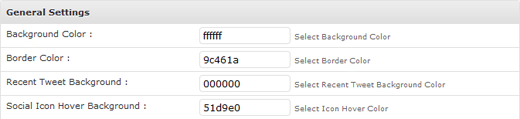
As you saw above, you can change the colors of the WP Social Toolbar to help match the color spectrum of your site. Using the color wheel, you have the option to change the background color, border color, recent tweet background and social icon hover background. All of this is done through General Settings.
You can also change the color of your icons between black, white and gray for best color contrast.
Social Network Icon Settings
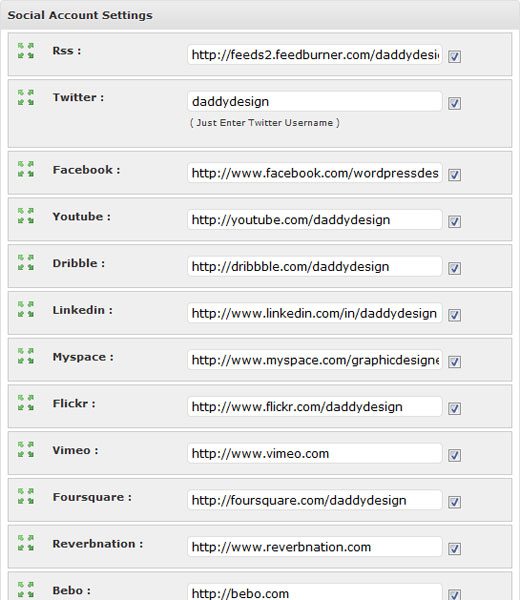
WP Social Toolbar (version 1.1) allows you to showcase 14 of the 24 social network icons that the plugin has to offer. You can also arrange the icons accordingly to your desired preference. This can be done under Social Profiles.
Available Icons: Apple, BeatPort, Bebo, Digg, Dribble, Facebook, Flickr, Foursquare, Hi5, iLike, Last.fm, LinkedIn, Meetup, MySpace, Ning, Orkut, Ping, ReverbNation, RSS, Skype, SoundCloud, Stumbleupon, Tumblr, Twitter, Vimeo, Xing, YouTube.
Recent Tweet Settings
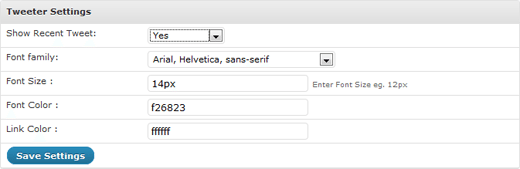
The Recent Tweet Settings allow you to change the font family, color, and size.
Don’t want to display your recent tweet? You can simply turn it off in the Recent Tweet Settings (see above)! Below is an example of the WP Social Toolbar with the recent tweet turned off:
Share Settings
These settings are for the tweet and FB ‘Like’ buttons. There are two available options; always tweet and share your website’s homepage or tweet and share the current page.
NEW. We added Google +1 Share button now!

Display Settings
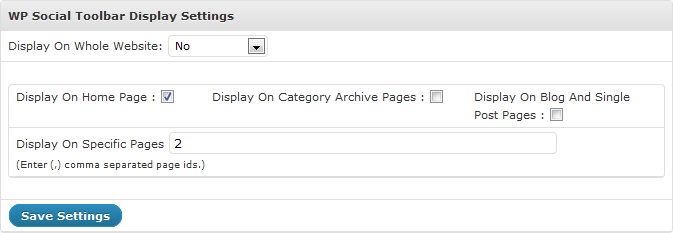
Another great feature about the WP Social Toolbar is that it does not have to be displayed throughout your entire site. In the Display Settings you are given the option to display it throughout the entire site, just on the home page, just on the archives, just on posts, or just on specific pages.
Version
1.0
- Released
1.1
- Stay closed feature. When user closes the toolbar, it will stay closed forever on full site until clicked open.
- Recent tweet fix. Added new recent tweet code that has less errors reading twitter feeds.
- 2 New social icons added. (Tumblr and Digg)
- Mobile hide. Toolbar is now disabled & hidden on all mobile phone platforms.
- Correct install path issue fixed. Toolbar will work now even if wordpress install was not created in the root of site.
1.2
- Retweet Recent tweet fix. RT now show in the recent tweet status message.
- iPad hide. Toolbar is now disabled & hidden on all iPad platforms.
1.3
- mod_security issue solved.
1.4
- NEW “close” icons.
1.5
- Google +1 Button Added. Settings for it in the backend. SHOW or HIDE. Default is hide.
- 1 New social network icon added (Xing).
- Recent TWEET error issue fixed.
1.6
- 2 New social networks icon added (BeatPort,SoundCloud).
- Share URL issue solved on archive pages.
1.7
- Spotify Icon Added.
- Current Page URL issue solved.
1.8
- Display Settings Bug Solved.
- Twitter Timestamp Option Added.
1.9
- Added Google+ Icon.
- Display Settings Bug Solved.
- Text Shadow Bug Solved.
2.0
- Facebook Fan Page share Option added.
- Icons Added in Admin Options.
2.1
- Email Icon Added.
2.2
- Google+ Button bug Solved.
2.3
- Google+ Button bug Solved.
2.4
- www. removed from twitter link.
- PHP notice’s removed.
WP Social Toolbar Live DEMO
The WP Social Toolbar plugin is currently live on this very page. Just simply look towards the bottom of your browser.
Download the WP Social Toolbar Plugin
Installation
- Upload the ‘wp-social-toolbar’ folder to the ‘/wp-content/plugins/’ directory.
- Activate the plugin through the ‘Plugins’ menu on WordPress.
- Adjust the custom settings on the WP Toolbar settings page.
- Insert all of your Social Network links on the “Social Profiles” page.
NOTES
Make sure to have:
<?php wp_footer();?>just before the closing body tag, usually this would be done in the “footer.php”.
Also make sure to have<?php wp_head(); ?>inside the head tags, usually this would be done in the “header.php”. Both of these functions are needed for most plugins to work because like ours, many plugins add javascript and html codes using these two functions.
If Error Reading Twitter Feed
Make sure your twitter account is not privacy protected.
Make sure Twitter is not down.
Reweet’s are having issues right now, we are trying to fix this.
Need Support? Have suggestions?
If you have any problems with this plugin, need help, or have suggestions for improvement, please leave us a comment below and we will respond as soon as possible. We will be adding 5 more icons in the next version so please comment on which ones you would like to see added.
PRO Version??
By popular demand, WP Social Toolbar Pro is in production and will be available soon. Please visit socialtoolbarpro.com to sign up and be notified when it’s available.


Pingback: WP Social Toolbar: Barra de ferramentas sociais para Wordpress | oSabeTudo.com
Pls can you add the +1 button?
Thx a loz
Yes, we are adding it very soon.
Hey Guys
Love the plugin – simply awesome.
Pingback: 5 Social Toolbars to Help Increase User Engagement on Your BlogBlogging Tips
Hello guys!
I’m started using ur plugin about two weeks ago, and it’sreally good, probably the best in this category!
By the way, I have an problem, it isn’t shown in IE8, I don’t know why, do you know maybe, does someone other already had same bug, or I’m first one?
And do you know maybe how to fix it, or it will be fixed in new version?
We have not heard or had this issue yet. We will look at your site to see why this is happening.
Hi there
I’m loving your toolbar, but I’m trying to add it to a NON wordpress site… anytips?
also, can you guys set it up for easy add-ons of icons? like under the icon selection box, another set of fields :
‘name’ – ‘import icon image file’
HI, Sorry its only available for wordpress right now and yes that import icon feature will be available in a later release.
do u have the pro version available yet
Hi Jason, Sorry not yet. Promise it will be available soon!
http://socialtoolbarpro.com/
Hi DD
Very nice plugin!
Currently have a few issues. When I scroll any type of video player (such as youtube) over the bar. The video always hover over the bar, which is strange because everything else is below the bar. I tried setting the z-index very high for the bar but no luck that way…
Also is there a trick to get the tweet count to work. I tweeted using several different accounts, the tweet messages show up fine but the tweet count always seems to stay at 0, no matter how many times I tweet or how many different accounts I use.
Any thoughts?
Hi Cory, Thank you! There’s no way to add z index or change the toolbar for that issue. You have to place ?wmode=opaque into your video code.
As for the tweet, sometimes twitter cache is slow. As you can see in the toolbar on this post the tweet count is working correctly.
Pingback: How To Establish Your Digital Presence | Florian Mettetal
Pingback: Feature: 10 WordPress Plugins Worth Plugging In To
Hello,
Was using the wp plug, fantsatic !
Much looking forward to a pro version.
But…
It no longer works in it’s present form. Is no longer present in my extensions panel, and is longer available for download from the wp site.
Any ideas ?
Best,
P
Hi, we have no clue why its not in the wordpress directory anymore. We are trying to fix it now!
Its fixed now! Version 1.5 will be available tomorrow.
Cool – THX !
This is simplified for anyone at any level can utilize the free tools provide of the highest quality. I am amazed the support that comes with each step. I had no idea that companies will still produce quality free tools to help the people who are just trying to support others with real content on their blogs.
Thanks team for an amazing journey that I have started sharing with others. Just improving peoples lives. That giving without expecting anything in return is a blessing. Your a great part of my free services and I have shared you good graces with the masses.
Thank you for the Kind Words William! Glad you appreciate it.
Hah … any thought to adding tumbler?
Pakar, Tumblr has already been added, 2 versions ago
Annoying how I had to go into editor to correct the false Facebook like button in the right corner. Besides from that, great plugin!
What do you mean by false like button? Please explain so we can fix.
Have you considered the option to show more than one tweet? Perhaps up to five running in a loop being fed one at a time?
Hi Carl, that’s a good suggestion. We will keep that in mind for future release. Thank you for the comment.
thanx for the plugin , and need requirements , i need color capacity to be 50% , so i can see ehat behind the toolbar and when you hover it , it will be 100% capacity , can we make it ??
Hi Hossam, We are trying to get that feature for the pro version. I will keep you updated.
Hi there’s a problem with google+ buttons, it hides the facebook like counter. How can i move it for it can be seen
Hi, I don’t see this issue happening on your site? We will look into this issue though.
I love your tool bar, it’s uber swanky… however is there a method that we ‘users’ can omit or hide the dd logo or reference link on the bottom right. I realize is your trademark and your development, but it is something that should be made an option in my opinion. Thanks dm.
We are coming out with a pro version which will have tons of new options and will include the DD icon hidden. It will be a very fair price as well.
Can someone help me?
Fatal error: Cannot use object of type stdClass as array in /home/acarajed/public_html/wordpress/wp-content/plugins/wp-social-toolbar/wp_social_toolbar.php on line 600
are you using version 1.6? also, your site is not showing up for me.
what php version is your wordpress database on?
No matter what I do I can’t get the Recent Tweets bar to come up on my site. My account is not on private, I’ve dectivated all other twitter plugins, and I’ve went over the settings countless times. I’d appreciate your help.
Php 5.2.17
Looks like your feed is showing now? did you edit something?
Its not showing again for me now but I went to it earlier and it was showing in Safari on a work computer but now it’s not again. Not working in any browser for me right now.
OK, we will keep looking into it. Could be something in your site conflicting with it and it also can be the twitter feed, as sometimes twitter feeds have issues.
Hi,
I really want to use this plugin, but it doesn’t show up on my site. I have it installed, and I am able to adjust the settings., but it doesn’t show up on my site.Can you help?
HI Lance, I just went to your site and I see it working? Color selection looks great btw. What did you have to fix?
How about to add a twitter follow button to the bar?
We were thinking about that but the twitter icon at the bottom left does the same thing.
Hey Guys Awesome Plugin!
I did run into a few issues with the latest 1.6 on my site. I noticed if you scroll an embed video over the bar (such as youtube or viemo) they appear over the bar while all other content is below the bar, not a big deal and Any suggestions on how to fix?
Also I notice the Google circle works perfect on all my post pages but seems to fail on my home page. I currently have the “share settings” set to “Individual/Post Page” is this expected?
Thanks for the great work!
Hi Cory, That’s not an issue with 1.6, its always been the case. There’s no way to add z index or change the toolbar for that issue. You have to place ?wmode=opaque into your video code.
As for the google +1 not working on home page, we will look into this issue.
Hi Cory,
Update to version 1.7, we fixed the google +1 button to work with home page and category pages.
Bar doesn’t show last tweet. How I can fix it?
Hi,
it is an awesome plug-in. For some reason though i cannot get the facebook Like button on the right side working, I can click on it but it does not show a number. The Google+ and Tweet button are working.
is there anything I can do to fix this?
Thanks!
Renco
It is not the plugin with this issue. The facebook like button is having issue’s for many people, facebook is working on this bug.
how to remove the dd option from the tool bar ?
We will be selling the pro version very soon with many more options including removing the logo. Sign up here to be notified once it’s available: http://socialtoolbarpro.com/
can you make sure the pro version allows people to put their site copyright in spare space of the footer bar?
also it would be better if the +1, tweet and fb like boxes dynamically scaled with counts, currently there seems to be a lot of wasted space to the right of the like count boxes
Not sure about adding copyright onto the toolbar itself, we will look into this. But we are adding a 30 to 40 pixel padding to footer, so anything the website had in the footer will now move up above the toolbar. And for your other request, to our knowledge, there’s no way to do this or we would of done this already
Great plugin. I only miss the “respect” button from Hyves (Dutch). Is it possible to create one?
we will try to add that to next version. We have over 25 more new icons going to be available in pro version
Translation Button (Google) and Pro Version without Ads and maybe some Features
its being worked on as we speak